
Introduction
Managing invoices is an important part of running a business, but traditional billing methods can take time and create unnecessary paperwork. A mobile invoicing app can simplify this process by allowing business owners, freelancers, and independent professionals to handle invoices directly from their smartphones. Instead of waiting until they return to a computer, users can create and manage billing information whenever they need it.
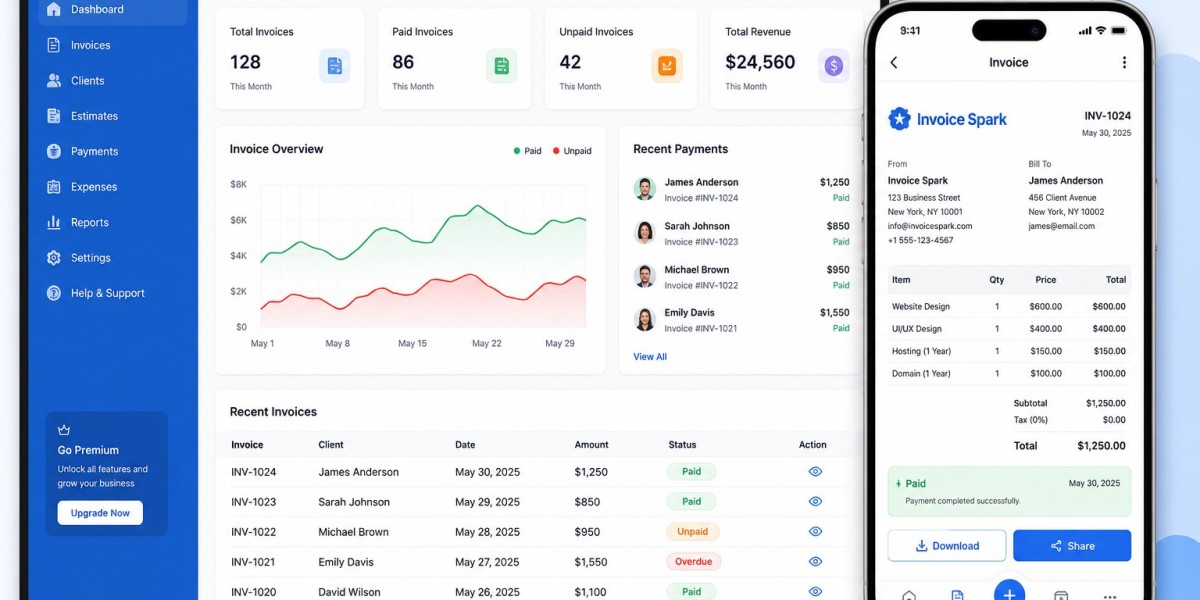
Modern invoicing tools such as Invoice Spark can make everyday billing more convenient by helping users organize customer details, prepare invoices, and maintain digital records. With the right workflow, mobile invoicing can save time while keeping business billing clear and organized.
What Is a Mobile Invoicing App?
A mobile invoicing app is a digital tool that allows users to create, manage, and share invoices using a smartphone or tablet.
Depending on the application, common features may include:
- Invoice creation
- Customer management
- Product and service details
- Price and quantity fields
- Invoice numbering
- Payment information
- Digital invoice sharing
- Invoice record management
The main purpose is to make billing more convenient without requiring users to rely on paper documents or a desktop computer for every invoice.
Why Is Mobile Invoicing Useful?
Mobile invoicing is useful because businesses do not always operate from a fixed location. Freelancers may work from home, cafes, client offices, or while traveling. Contractors and service providers may spend most of their working day outside an office.
Mobile billing can help users:
- Save administrative time
- Create invoices while away from a computer
- Reduce paperwork
- Keep client information organized
- Send invoices more quickly
- Maintain digital billing records
- Reduce repeated data entry
For small businesses, these simple improvements can make everyday financial tasks easier to manage.
1. Create Invoices From Anywhere
One of the biggest advantages of mobile invoicing is flexibility. Users can prepare an invoice wherever they have access to their smartphone.
For example, a freelancer who completes a project at a client's location can prepare the invoice immediately instead of waiting until they get home.
A typical process may involve:
- Open the invoicing app.
- Select the customer.
- Add products or services.
- Enter prices and quantities.
- Review the total.
- Generate the invoice.
- Send it to the customer.
This straightforward workflow can reduce delays in everyday billing.
2. Manage Customers More Efficiently
An invoice app with client management can combine invoicing and customer information in one convenient system.
Instead of maintaining separate records for customers and invoices, users can keep important information together.
Client information may include:
- Customer name
- Company name
- Email address
- Phone number
- Billing address
- Previous invoice information
Keeping this information organized can reduce repeated typing and make it easier to prepare future invoices.
3. Use an Invoice and Billing App for Android
Android smartphones are widely used for business activities, and an invoice and billing app for Android can provide convenient access to invoicing features.
A mobile billing application can be particularly helpful for:
- Freelancers
- Contractors
- Consultants
- Small retailers
- Service providers
- Independent professionals
Users can handle routine billing tasks without needing to carry paper invoices or rely on a desktop computer.
The available features vary between applications, so businesses should choose tools that match their invoicing requirements.
4. Reduce Repeated Data Entry
Repeatedly typing the same customer and business information can waste time. It can also increase the possibility of small errors.
Digital invoicing can make the process easier by allowing frequently used information to be saved.
For example, users may be able to store:
- Business information
- Customer details
- Frequently used services
- Product descriptions
- Standard prices
- Payment terms
Once these details are organized, preparing a new invoice may require only a few updates.
5. Send Invoices More Quickly
Delaying an invoice can also delay the billing process. Mobile invoicing makes it easier to prepare and send invoices soon after a product is delivered or a service is completed.
Faster invoice delivery can help businesses maintain a consistent billing routine.
A simple workflow is:
Complete work → Create invoice → Review details → Send invoice → Save record
Following a consistent process can make invoicing easier to manage over time.
6. Keep Billing Records Organized
Good invoicing is not only about creating documents. Businesses also need to keep track of their billing activity.
Digital invoice records can help users organize:
- Paid invoices
- Unpaid invoices
- Sent invoices
- Invoice dates
- Customer information
- Amounts billed
Organized records can make it easier to review previous transactions and identify invoices that still require attention.
Invoice Spark can support this type of digital workflow by helping businesses handle their everyday invoicing tasks in a more organized way.
7. Reduce Common Billing Mistakes
Manual invoicing can sometimes lead to errors such as incorrect prices, missing information, or calculation mistakes.
A structured digital invoicing process can help users review important details before sending an invoice.
Always check:
- Customer information
- Invoice number
- Date
- Product or service description
- Quantity
- Price
- Taxes or discounts
- Total amount
- Payment instructions
Taking a few moments to review an invoice can help maintain accurate billing records.
8. Improve Professional Communication
An invoice is more than a request for payment. It is also a business document that communicates important information to the customer.
A clear invoice should make it easy to understand:
- Who issued the invoice
- Who needs to pay
- What was purchased or provided
- How much is due
- When payment is expected
- How payment can be made
Digital invoicing can make it easier to create consistent billing documents and share them with customers.
9. Save Time on Everyday Administration
Administrative tasks can take up a significant amount of time for small businesses. Mobile invoicing can help reduce some of this workload by bringing common billing tasks into one digital workflow.
Instead of switching between notebooks, spreadsheets, documents, and email, users can use a dedicated invoicing solution for many routine tasks.
Invoice Spark can help make this process more convenient for users who want a simpler approach to creating and managing invoices.
Best Practices for Mobile Invoicing
To get better results from mobile invoicing, follow these simple practices:
- Keep customer details updated.
- Use clear descriptions for products and services.
- Review invoice totals before sending.
- Use consistent invoice numbers.
- Add clear payment instructions.
- Send invoices soon after completing work.
- Keep digital records organized.
- Check unpaid invoices regularly.
- Protect access to your business account and device.
These habits can help businesses maintain a reliable invoicing process.
Common Mistakes to Avoid
Even with digital tools, users should avoid common invoicing mistakes.
Some problems include:
- Incorrect customer details
- Missing invoice numbers
- Wrong prices or quantities
- Unclear service descriptions
- Incorrect totals
- Missing payment terms
- Delayed invoice delivery
- Poor record keeping
A quick review before sending can help prevent many of these issues.
FAQs
What is a mobile invoicing app?
It is a digital application that allows users to create, manage, and share invoices from a smartphone or tablet.
Is mobile invoicing useful for freelancers?
Yes. Freelancers can use mobile invoicing to prepare and send invoices while working from different locations.
Can an invoice app manage client information?
Many invoicing applications include client management features that allow users to store and organize customer information for future billing.
Can I use an invoice and billing app for Android?
Yes. Android users can choose from mobile invoicing applications designed to support invoice creation and billing tasks on compatible devices.
Does mobile invoicing save time?
It can reduce repetitive data entry, make invoice information easier to access, and allow users to create invoices without returning to a desktop computer.
What should I check before sending a mobile invoice?
Check the customer details, invoice number, date, products or services, prices, quantities, total amount, and payment instructions.
Is Invoice Spark suitable for everyday invoicing?
Invoice Spark can be used as a digital invoicing solution for businesses and freelancers looking to simplify routine invoice creation and management.
Conclusion
Mobile invoicing has made it easier for freelancers and businesses to manage billing while working from different locations. Instead of relying entirely on paper documents or desktop computers, users can create, review, and share invoices directly from their smartphones.
Features such as client management, digital records, reusable information, and Android compatibility can make everyday billing more convenient. With a consistent process and tools such as Invoice Spark, businesses can spend less time handling routine paperwork and more time focusing on their work.
For more detail visit:https://edward0011.substack.com/p/9-powerful-ways-to-create-an-invoice