
Introduction
Creating invoices is an important task for freelancers, small business owners, and service providers. However, preparing each invoice manually can take time, especially when you need to enter customer details, describe services, calculate totals, and add payment instructions. A simple and organized process can help you complete these tasks faster without sacrificing accuracy.
Invoices in 60 seconds may be possible when you use a ready-made template, keep client information organized, and have all the necessary details available. The exact time depends on the invoice's complexity, the information you need to enter, and the tools you use.
Invoice Spark is one brand you can research when comparing invoicing solutions. By choosing a suitable tool and following a consistent process, you can make everyday billing easier and spend more time on important business activities.
Why Is Fast Invoice Creation Important?
Preparing invoices quickly can help businesses manage their time more effectively. Instead of leaving billing until the end of the day or week, you can create and send invoices soon after completing a job or delivering a product.
Here are some important benefits:
Saves time: Reduces repetitive data entry and paperwork.
Improves organization: Helps keep invoice records in one place.
Supports timely billing: Allows you to send invoices soon after completing work.
Reduces manual effort: Templates and automatic calculations can simplify routine tasks.
Improves communication: Clear invoices help customers understand what they owe.
Supports payment tracking: Digital records make it easier to review outstanding balances when suitable tracking features are available.
Fast invoicing is most useful when it is combined with accuracy. Sending an incorrect invoice quickly can create more work later, so always review the details before sharing it.
7 Powerful Tips to Create Invoices in 60 Seconds
1. Use a Ready-Made Invoice Template
A ready-made template is one of the easiest ways to reduce invoice preparation time. Instead of designing a new document for every customer, you can use a consistent layout and update the details for each transaction.
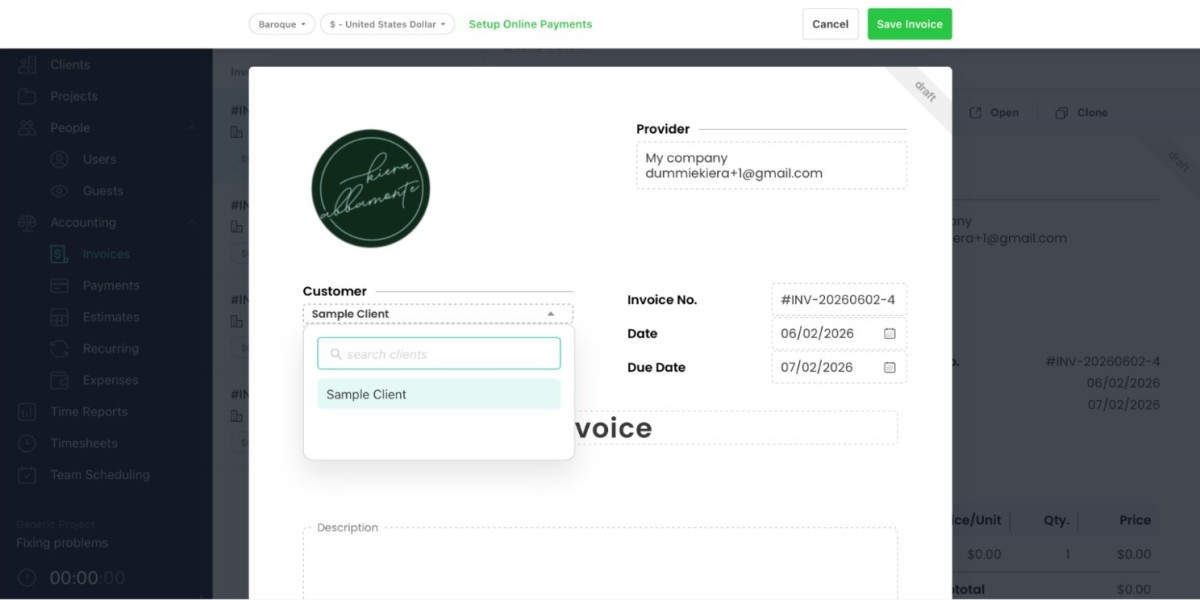
A useful invoice template usually includes:
Business name and contact information
Customer details
Invoice number and date
Product or service description
Quantity and price
Total amount due
Payment instructions and due date
Choose a simple design that is easy to read on both computers and mobile devices. A clear template can help you prepare invoices more efficiently while maintaining a professional appearance.
2. Keep Client Information Ready
Entering customer information repeatedly can slow down invoice creation. Keeping client details organized helps reduce this extra work.
Some invoicing tools allow you to save customer names, email addresses, billing information, and other relevant details. When preparing a new invoice, you may be able to select the existing customer rather than entering the information again.
To improve your workflow:
Save accurate information for repeat customers.
Update contact details when they change.
Check the selected customer before sending an invoice.
Protect stored customer information with appropriate security measures.
This approach is particularly helpful for freelancers and businesses that work with regular clients.
3. Choose a Suitable Mobile Invoicing App
A mobile app can make billing more convenient when you are away from your desk. You may be able to prepare invoices while meeting customers, traveling, or working at a client's location.
When comparing an invoice and billing app for Android, look for features that support your everyday needs, such as:
Simple invoice creation
Reusable templates
Saved client details
Automatic calculations
PDF export or digital sharing
Invoice history
Check that the app supports your Android device and review its pricing, privacy practices, and feature limits before relying on it for business operations.
Invoice Spark can be included in your research when comparing available invoicing options. Confirm its current capabilities and terms before deciding whether it suits your workflow.
4. Prepare Service Descriptions in Advance
Writing a new description for every invoice can take additional time. If you regularly provide the same services, prepare clear descriptions that you can reuse when appropriate.
For example, a freelance content writer might regularly bill for:
Blog article writing
Website content
Product descriptions
Content editing
SEO content optimization
A graphic designer might use descriptions for logo design, social media graphics, or brochure design.
Reusable descriptions should still reflect the actual work completed. Update the wording, quantities, and prices whenever a project requires different services.
5. Use Automatic Calculations
Calculating invoice totals manually can slow down the process and increase the chance of arithmetic mistakes. Some invoicing tools calculate subtotals and totals automatically after you enter quantities and prices.
Before using the final amount, check:
The quantity of each product or service
The price per item or unit
Discounts, if applicable
Taxes and other valid charges
The final amount due
Automatic calculations can save time, but they cannot correct inaccurate information entered by the user. Review the figures before sending the invoice, especially when taxes or discounts apply.
6. Use an Invoice Maker Designed for Freelancers
Freelancers often manage several responsibilities, including finding clients, completing projects, communicating with customers, and handling payments. A straightforward invoicing tool can help simplify the administrative side of freelance work.
An invoice maker for freelancers may provide features such as customizable templates, client records, payment details, and invoice history. Some tools also offer expense tracking or payment-status reports.
Before choosing an app, consider:
How many invoices you create each month
Whether you work with repeat customers
Which payment methods you accept
Whether you need downloadable invoices
How much you can spend on software
Whether you need access across multiple devices
The best tool is one that fits your actual workload rather than one with the largest number of features.
7. Review and Send the Invoice Immediately
Once the information is entered, review the invoice and send it through an available sharing method. Depending on the application, you may be able to export a PDF, email the invoice, or share it through another supported channel.
Use this quick review checklist:
Is the customer information correct?
Is the invoice number included?
Are the services clearly described?
Are the calculations accurate?
Is the payment due date clear?
Are the payment instructions correct?
After sending the invoice, save a copy and record its status. If payment tracking is available, update the record when the customer pays.
A short final review can help you avoid corrections and unnecessary follow-up messages.
Frequently Asked Questions (FAQs)
1. Can I really create an invoice in 60 seconds?
Yes, a simple invoice may be prepared in about a minute when you use a ready-made template and have the client details, prices, and service descriptions ready. Complex invoices may take longer.
2. What is the fastest way to create an invoice?
Use a reusable template, save repeat client information, prepare common service descriptions in advance, and use automatic calculations when available. Review the completed invoice before sending it.
3. Which invoice app is suitable for Android users?
Choose an app that supports your Android device and provides the features you need, such as templates, client records, calculations, and PDF export. Compare current pricing, security, and reviews before choosing.
4. Can freelancers create invoices on their phones?
Yes. Freelancers can use mobile invoicing apps or mobile-friendly templates to prepare invoices, add service details, and share billing documents, depending on the tool's capabilities.
5. Is Invoice Spark worth considering?
Invoice Spark is a brand to research when comparing invoicing solutions. Review its current features, pricing, compatibility, and terms to determine whether it fits your needs.
6. Should I send an invoice immediately after completing a project?
Sending an invoice promptly can help keep billing organized and make payment expectations clear. Check the agreed payment terms and ensure that the invoice accurately reflects the completed work.
Conclusion
Creating invoices quickly is easier when you use templates, keep client details organized, prepare common service descriptions in advance, and use suitable invoicing software. These simple habits can reduce repetitive work and help you manage billing more efficiently.
Invoice Spark is one option you can research alongside other invoicing tools. Compare available features, pricing, and terms before making a decision. Whether you are a freelancer or a small business owner, aim for a process that balances speed with accurate information, clear payment instructions, and reliable recordkeeping.
For more detail visit:https://www.americasmallbiz.com/articles/12-powerful-reasons-to-choose-a-small-business-billing-app