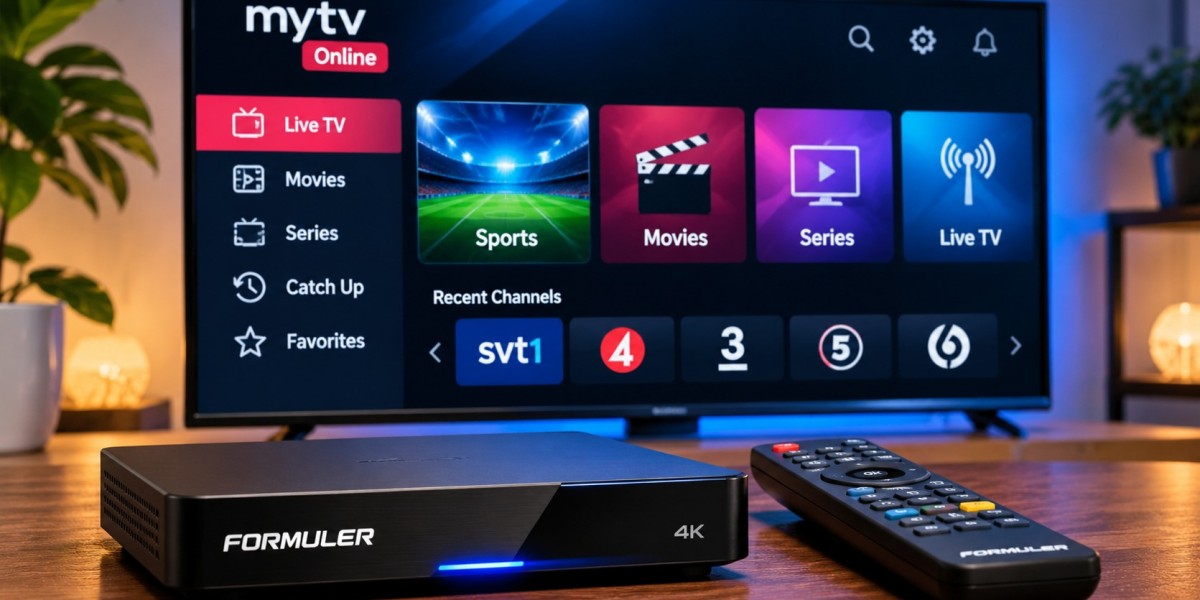

Formuler streaming boxes are popular with IPTV users because they combine dedicated television hardware with the MyTVOnline application. Instead of relying entirely on a Smart TV app, users can connect the box to a television and manage live TV, movies, series, favorites, and program information from one interface.
A smooth setup depends on entering the correct connection details, choosing the right login method, and maintaining a stable internet connection.
What Do You Need for IPTV on Formuler?
A typical setup requires:
A compatible Formuler device
Television with HDMI
Stable internet connection
IPTV subscription
MyTVOnline application
Portal or playlist information
The exact connection method depends on the IPTV service.
What Is MyTVOnline?
MyTVOnline is Formuler's IPTV application designed for its streaming devices.
Depending on the model and software version, it may support features such as:
Live TV
Movies and series
Electronic Program Guide
Favorites
Channel categories
Catch-up where available
Multiple connections or playlists
Recording features on supported setups
Available features can differ between devices and service configurations.
Choose the Correct Connection Method
Before entering any information, check what your IPTV provider has supplied.
Common connection methods include:
Portal Connection
A portal setup normally requires a server or portal URL.
The Formuler device may also display an identifier that the service uses to authorize the box.
Username and Password
Some setups use a server address together with a username and password.
This can be easier than entering a long playlist URL manually.
M3U Playlist
MyTVOnline versions that support playlists may allow users to add an M3U URL directly.
Users considering services such as Rapid IPTV should check the available device guidance and confirm which login method is intended for their Formuler setup.
Enter Connection Details Carefully
Many failed setups are caused by small typing mistakes.
Check:
Server address
Portal URL
Username
Password
M3U URL
Make sure there are no extra spaces before or after the information.
If a connection previously worked but suddenly fails, avoid immediately changing every setting. First confirm whether the subscription is active and whether the internet connection is working.
Use Ethernet When Possible
Formuler boxes are usually placed near the television, making Ethernet a practical option.
A wired connection can provide more consistent performance than Wi-Fi and reduce issues caused by:
Wireless interference
Weak signal strength
Distance from the router
Busy home networks
Ethernet is especially useful for long viewing sessions and higher-resolution streams.
Wi-Fi Can Still Work Well
A wired connection is not always practical.
If you use Wi-Fi, position the router carefully.
Try to keep it:
In an open location
Away from large metal objects
Within reasonable distance of the Formuler box
Away from major sources of interference
If IPTV buffers while other devices near the router work normally, weak signal strength at the television may be the problem.
Organize Channels With Favorites
Large IPTV channel lists can be difficult to browse.
MyTVOnline may allow frequently watched channels to be added to favorites.
This can be useful for:
Sports
News
Entertainment
Movies
Family channels
International programming
Keeping favorites focused makes navigation much faster than scrolling through the full channel library.
Use the EPG for Live TV
An Electronic Program Guide helps users see what is currently playing and what is scheduled next.
Depending on the available data, the guide may display:
Program names
Start times
End times
Upcoming programs
Channel schedules
If the guide shows incorrect times, check the Formuler device's date and timezone before changing other settings.
Refresh the EPG When It Looks Outdated
Program information can become outdated if guide data has not refreshed properly.
Look for an EPG refresh or update option inside MyTVOnline.
Restarting the application may also help if the guide has stopped updating.
Keep in mind that EPG availability depends on the information supplied to the player.
Why Channels May Not Load
A channel failing to open does not always mean the complete IPTV setup is broken.
Possible causes include:
Temporary stream problem
Weak internet connection
Incorrect account information
Expired subscription
Application issue
Device network problem
Test several channels before changing settings.
If only one or two streams fail, the problem may be limited to those sources.
Why Everything May Stop Working
If no channels or content load, check the basics first.
Confirm:
The Formuler box has internet access.
The subscription is active.
The server or portal address is correct.
The username and password are correct.
The MyTVOnline application is updated.
The device date and time are correct.
Working through these steps individually is better than resetting the entire box immediately.
Buffering on Formuler Boxes
Buffering can be caused by several factors.
Common possibilities include:
Weak Wi-Fi
Network congestion
Router problems
Background downloads
Higher-resolution streams
Temporary stream issues
Device performance
If buffering affects every channel, test the internet connection.
If only one stream is affected, the problem may not be related to the local network.
Restart the Box Before Resetting It
A restart can clear many temporary problems.
If MyTVOnline begins behaving strangely:
Close the application.
Restart the Formuler box.
Restart the router if necessary.
Wait for the internet connection to return.
Open MyTVOnline again.
Test several channels.
A full factory reset should normally be reserved for situations where simpler troubleshooting has failed.
Keep Formuler Software Updated
System updates can improve:
Security
Stability
Network performance
Application compatibility
MyTVOnline features
Use the device's normal update process rather than downloading unofficial firmware from unknown websites.
Incorrect firmware can cause serious problems.
Update MyTVOnline
The IPTV application itself may also receive updates.
An updated version can include:
EPG improvements
Playback fixes
Interface changes
Better playlist handling
Stability improvements
If the application begins freezing or closing unexpectedly, check for an update before reinstalling anything.
Recording on Formuler Devices
Some Formuler setups support recording when compatible storage and service conditions are available.
Recording may require:
USB storage
Sufficient free space
Stable internet
Supported player features
Appropriate stream availability
Test a short recording before relying on the feature for an important event.
Timeshift and Catch-Up Are Different
Users sometimes confuse timeshift with catch-up.
Timeshift allows temporary control of a live stream, such as pausing or moving backward during the current viewing session.
Catch-up provides access to previously broadcast content when supported by the service.
Not every channel or subscription supports these features.
Manage Storage Carefully
Streaming boxes have limited internal storage.
Too many apps or saved files can reduce available space.
Periodically remove:
Unused applications
Old recordings
Unnecessary downloads
Keeping free storage available can help the device remain responsive.
Protect Your Login Information
Do not publicly share:
Usernames
Passwords
Portal URLs containing account information
Private M3U links
Screenshots showing credentials
If you need technical help, hide private information before posting screenshots.
Formuler vs Smart TV Apps
A Smart TV application may be enough for users who want the simplest possible setup.
A Formuler box can be useful when users prefer:
Dedicated IPTV hardware
MyTVOnline interface
More storage options
Easier remote navigation
A system independent of the Smart TV platform
The best choice depends on the television, preferred player, and viewing habits.
Formuler vs Android TV Boxes
Formuler devices are Android-based but are designed heavily around television and IPTV use.
A general Android TV box may offer a wider selection of IPTV players, while a Formuler device provides tighter integration with MyTVOnline.
Neither option is automatically better.
Users should choose based on the interface and features they actually need.
Simple Troubleshooting Checklist
If IPTV stops working on a Formuler device, check:
Internet connection
Subscription status
Login details
Portal or server address
Several different channels
MyTVOnline updates
Device software updates
Router performance
This order can help identify the problem without making unnecessary changes.
Final Thoughts
Formuler boxes can provide a convenient IPTV experience when MyTVOnline and the network are configured correctly.
The most important steps are choosing the correct connection method, entering subscription details accurately, and maintaining a stable internet connection.
Users should also organize favorites, keep the EPG refreshed, protect account details, and update both the device and application when appropriate.
If problems appear, start with basic network and login checks before resetting the box or changing advanced settings. A properly configured Formuler device can provide a practical way to access compatible live TV, sports, movies, and series through a television-focused interface.