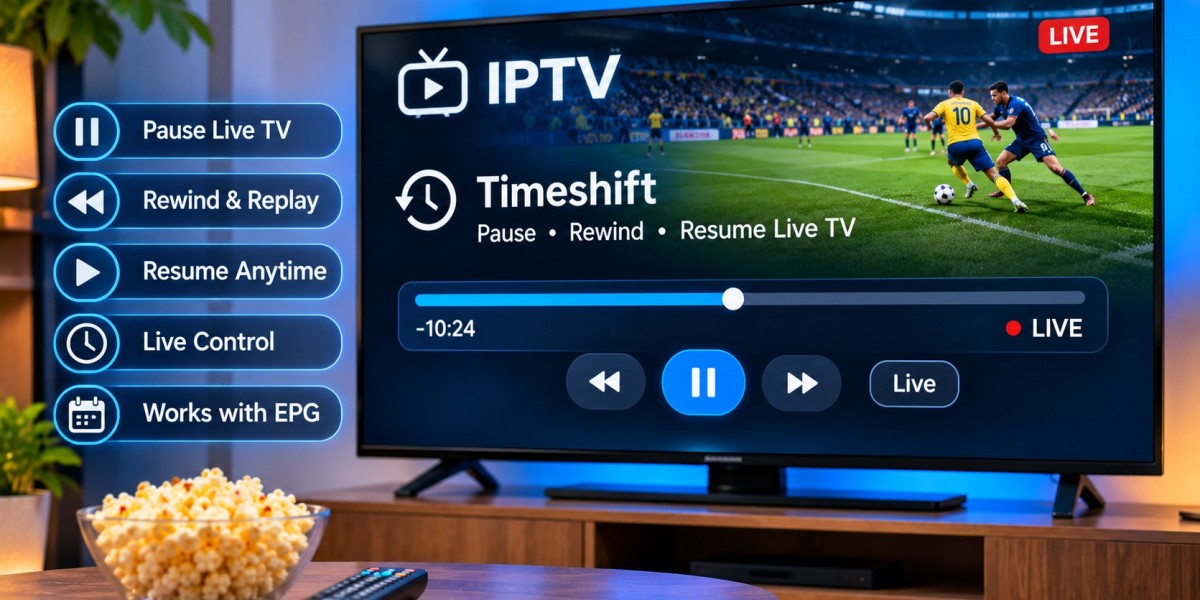

Live television traditionally requires viewers to follow a fixed schedule. If someone leaves the room, receives a phone call, or misses an important moment, the broadcast continues.
Timeshift can make live IPTV more flexible by allowing supported streams to be paused, rewound, or resumed during playback. The exact functionality depends on the IPTV service, player, and device, but understanding how timeshift works can help viewers decide whether it is useful for their setup.
What Is IPTV Timeshift?
Timeshift is a feature that temporarily stores part of a live television stream so the viewer can move backward or pause playback without completely leaving the channel.
For example, a viewer watching a live sports event might pause the stream for a few minutes and then continue from the same point.
Depending on the player and service, timeshift may allow users to:
Pause live TV
Resume from the paused position
Rewind recent content
Move forward toward the live broadcast
Replay a recently missed moment
Timeshift availability is not universal, and not every channel or IPTV player supports it.
How Does Timeshift Work?
When timeshift is active, the IPTV application or service creates a temporary buffer of the live stream.
Instead of displaying only the latest moment of the broadcast, the player keeps a limited amount of recent video available.
If the viewer presses pause, the live broadcast continues in the background while the application remembers the point where playback stopped.
When the viewer resumes, playback continues from the stored position rather than immediately jumping to live television.
Timeshift vs Catch-Up TV
Timeshift and catch-up are often confused because both allow viewers to watch something that has already been broadcast.
However, they serve different purposes.
Timeshift
Timeshift normally works during an active live viewing session.
It is useful when someone wants to pause or rewind what they are currently watching.
Catch-Up TV
Catch-up allows users to access selected programs after the original broadcast has already finished.
Catch-up may remain available for a longer period, depending on the service.
A simple way to think about the difference is that timeshift manages the current live session, while catch-up provides access to previous scheduled programming.
Timeshift vs Recording
Recording is also different from timeshift.
A recording creates a saved copy of the program that may remain available after the viewing session ends.
Timeshift usually relies on temporary storage.
When the channel is changed or the player is closed, the buffered content may disappear.
Users who want to keep a program for later should therefore check whether their IPTV player offers actual recording functionality rather than relying on timeshift.
Why Timeshift Is Useful for Live Sports
Live sports are one of the situations where timeshift can be particularly useful.
Viewers may want to:
Replay an important moment
Pause during a break
Rewatch a goal or key play
Temporarily leave the television
Continue viewing without missing action
However, users should remember that the feature depends on the specific player, service, and channel.
Some applications may provide a longer rewind window than others.
Timeshift for News and Live Programs
The feature is not limited to sports.
Timeshift can also help when watching:
News broadcasts
Talk shows
Live entertainment
Award programs
Interviews
Current-affairs programming
If a viewer misses part of a conversation, being able to rewind a few minutes can be more convenient than waiting for a replay or searching for the program later.
Device Compatibility Matters
Timeshift support can vary considerably between devices.
An IPTV player on an Android TV box may offer features that are not available in the same way on a Smart TV.
Users may encounter timeshift on:
Android TV devices
Streaming boxes
Fire TV devices
Smart TVs
Computers
Apple TV
Mobile devices
The hardware, operating system, and IPTV application all influence what is possible.
Before relying on timeshift, users should confirm that their chosen player supports it on their specific device.
Storage Can Affect Timeshift
Some IPTV applications use local device storage for timeshift buffering.
This means available storage may influence how long the player can retain recent content.
Devices with very limited free space may struggle with large buffers.
Users should periodically check available storage and remove unused applications or unnecessary files if the streaming device becomes slow.
Some players may also allow users to choose an external storage location.
Internet Stability Is Still Important
Timeshift does not eliminate the need for a reliable internet connection.
The IPTV stream must still arrive continuously while the application creates the temporary buffer.
An unstable connection can cause:
Gaps in playback
Buffering
Failed rewinding
Playback interruptions
Incomplete temporary storage
A stable wired or wireless network therefore remains important.
Ethernet Can Help Permanent TV Setups
If the streaming device is located near the router, Ethernet can provide a reliable connection.
A wired connection can reduce wireless interference and may be helpful when live IPTV features such as timeshift are used frequently.
Wi-Fi can also work well when coverage is strong.
Users should focus on stability rather than simply choosing whichever connection has the highest advertised speed.
Understand the Playback Timeline
When timeshift is available, the player may display a timeline that shows the relationship between the viewer's current position and the live broadcast.
For example, the interface might indicate that playback is:
Live
Two minutes behind live
Ten minutes behind live
Users can often move forward through the stored buffer until they return to the current broadcast.
This is especially useful after pausing a program for several minutes.
Channel Switching May Clear the Buffer
Timeshift content is usually temporary.
Changing to another channel can cause the previous channel's buffered video to disappear.
Returning to the original channel may therefore start from the current live position rather than the earlier stored point.
The exact behavior depends on the IPTV application.
Users who need permanent access to a program should consider recording or catch-up instead.
Look for Clear Player Controls
A good timeshift interface should be easy to operate with the television remote.
Useful controls may include:
Pause
Play
Rewind
Fast-forward
Return to live
Timeline navigation
Complicated menus can make a useful feature frustrating to operate.
When choosing an IPTV player, users who care about live television should test how easily these functions can be accessed.
EPG and Timeshift Can Work Together
An Electronic Program Guide provides information about current and upcoming television programs.
When timeshift is supported, the EPG can add useful context by showing which program is currently being viewed even if playback is slightly behind the live broadcast.
This can help users understand where they are within the schedule.
Accurate device time and timezone settings are important for proper EPG information.
How Timeshift Fits Nordic Viewing
Nordic viewers may use IPTV for Swedish and Scandinavian news, sports, entertainment, and international programming.
For households that regularly watch live television, features such as EPG, timeshift, catch-up, and recording can make viewing more flexible.
People comparing services aimed at Sweden and the wider Nordic market can include VIKING IPTV in their research while reviewing current device compatibility, available subscriptions, setup information, and the features supported by their preferred IPTV player.
Keep Your IPTV Player Updated
Timeshift depends on the application correctly managing live playback and temporary storage.
Software updates may improve:
Playback stability
Buffer management
Remote controls
Device compatibility
EPG integration
Users should keep both the IPTV player and streaming device updated when official updates are available.
What to Check When Timeshift Does Not Work
If pause or rewind controls are unavailable, users can check several areas.
Confirm Player Support
Not every IPTV application includes timeshift.
Try Another Channel
The feature may not be supported on every stream.
Check Available Storage
Limited device storage may affect local buffering.
Restart the Application
Temporary software problems can sometimes disable playback features.
Check the Network
An unstable internet connection can prevent the buffer from building correctly.
Update the Player
An outdated application may have compatibility problems with newer device software.
Do Not Assume Timeshift Is Always Available
An IPTV player may display timeshift controls even when a particular stream does not support the feature correctly.
Similarly, the service may support timeshift but the chosen application may not.
The feature requires the service, stream, player, and device to work together.
Users should therefore test it rather than assuming availability based only on a menu option.
Final Thoughts
Timeshift can make live IPTV more convenient by allowing viewers to pause, rewind, and resume supported television streams.
It is particularly useful for sports, news, and other live programming where missing a few minutes can matter.
Timeshift should not be confused with catch-up or recording. It is mainly a temporary live-TV feature rather than a permanent way to save programs.
With a compatible player, suitable device, enough storage, and a stable network connection, timeshift can add valuable flexibility to everyday IPTV viewing.